
04 / 06   Digital encoding

Application note

Encoding Color for Digital Images

Separate RGB coordinates, nonlinear encoding, and appearance-oriented controls.

A digital color triplet is meaningful only when its encoding and color space are known. Camera values, display commands, and colorimetric measurements can all contain three numbers while describing different quantities. A reliable imaging workflow keeps these definitions attached to the data.

Read the code value

An eight-bit channel stores 256 levels, from 0 through 255. Three such channels provide 2563=16,777,216256^3=16{,}777{,}216 possible triplets. This is a count of codes, not a guarantee of equally spaced colors, visible differences, or measurement precision.

In a six-digit hexadecimal color, each pair represents one byte:

#RRGGBB,byte=16dhigh+dlow\#\mathrm{RRGGBB},\qquad \mathrm{byte}=16d_{\mathrm{high}}+d_{\mathrm{low}}

For example, #00858A contains encoded channel values (0,133,138)(0,133,138). On a conventional sRGB web page, those values use the sRGB primaries, D65 reference white, and nonlinear transfer function. A file tagged with a different RGB profile can assign a different color to the same triplet.

Decode before calculating light

For a normalized sRGB code cc between zero and one, the corresponding linear-light component CC is:

C={c/12.92,c≤0.04045[(c+0.055)/1.055]2.4,c>0.04045C=\begin{cases} c/12.92,&c\leq0.04045\\ \left[(c+0.055)/1.055\right]^{2.4},&c>0.04045 \end{cases}

The inverse operation converts linear-light values back into display codes. Its curved relationship allocates more code resolution near dark levels than a uniform linear encoding. Describing sRGB as a single “gamma 2.2” law is an approximation.
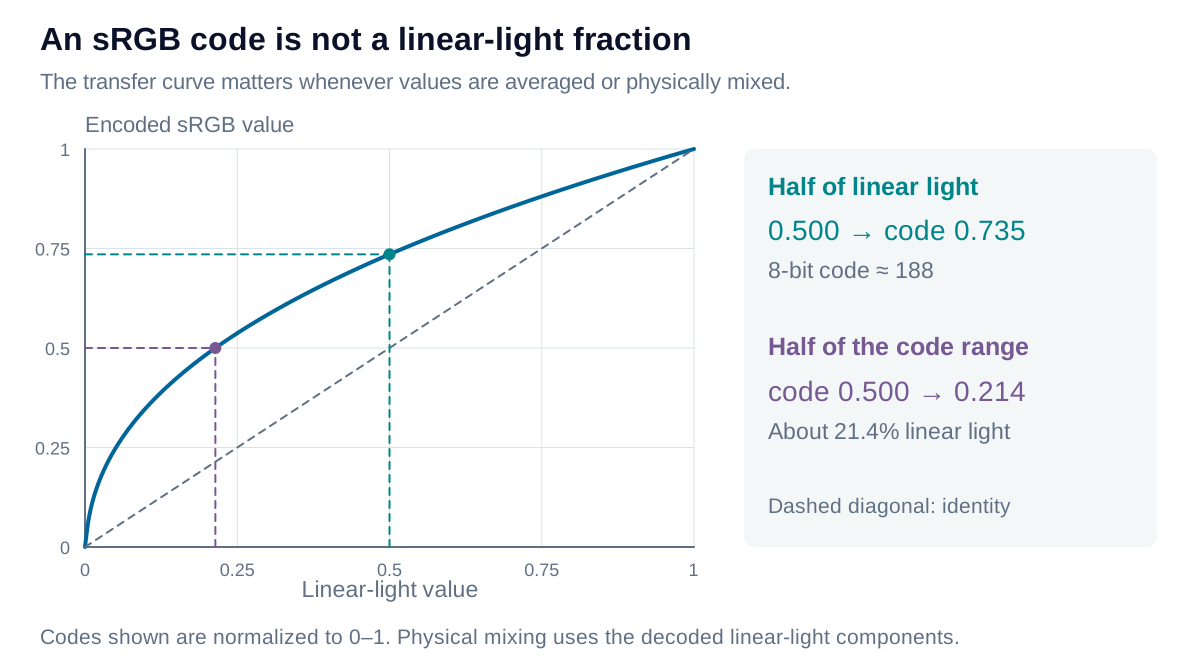
The sRGB encoding curve maps linear-light value to encoded value. Half linear light encodes near 0.735, while an encoded value of one half represents only about 0.214 linear light.

View diagram at full size

A normalized code of 0.5 corresponds to approximately 0.214 linear light. Conversely, 0.5 linear light encodes near 0.735, or byte value 188. Physical source mixing and radiometric averaging therefore require linearization. Re-encode only after the calculation, and handle out-of-gamut values explicitly.

Use HSV as a control system

HSV rearranges an RGB triplet into hue, saturation, and value. It is convenient for selecting colors, but it does not create additional gamut or a perceptually uniform distance scale. Here r,g,br,g,b are normalized encoded sRGB values:

v=max⁡(r,g,b),d=v−min⁡(r,g,b),s={0,v=0d/v,v>0v=\max(r,g,b),\quad d=v-\min(r,g,b),\quad s=\begin{cases}0,&v=0\\d/v,&v>0\end{cases}

Hue follows the dominant channel and wraps around a full turn. For neutral gray, d=0d=0 and hue is undefined; software may display zero as a storage convention. HSV value is the largest encoded component, not luminance or perceptual lightness. Yellow and blue can both have v=1v=1 while differing greatly in luminance.

Convert a non-neutral RGB triplet to HSV hue

For d>0d>0:

H=60∘×{((g−b)/d) mod 6,v=r(b−r)/d+2,v=g(r−g)/d+4,v=bH=60^\circ\times\begin{cases} ((g-b)/d)\bmod6,&v=r\\ (b-r)/d+2,&v=g\\ (r-g)/d+4,&v=b \end{cases}

Wrap the result into [0∘,360∘)[0^\circ,360^\circ). Report saturation and value as percentages when convenient. At d=0d=0, omit hue or mark it undefined; no hue direction exists along the neutral axis.
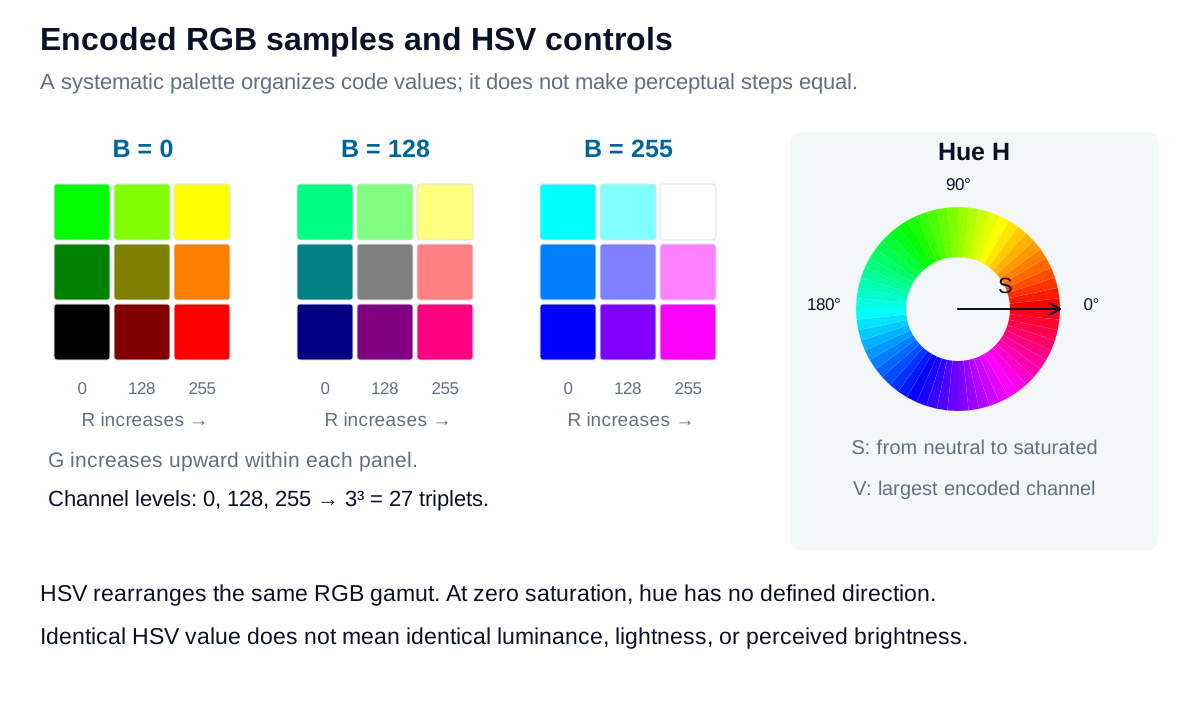
Three slices of an encoded RGB cube sample channel levels 0, 128, and 255. Adjacent hue, saturation, and value controls reorganize the same finite set of colors.

View diagram at full size

Preserve the measurement meaning

A palette sampled from an RGB cube is a useful design structure, not an even sampling of human color differences. Likewise, increasing bit depth reduces quantization but does not enlarge the primaries’ gamut or remove camera noise.

For inspection, retain the camera’s acquisition settings, processing, and calibration. White balance and tone mapping can improve an image’s appearance while changing the values used for measurement. Treat on-screen swatches as previews; quantitative color acceptance requires a controlled measurement and viewing method.

Explore the model

Linear light and sRGB code

See why half the encoded value does not represent half the light.

Change the values to update the results and visualization.

Encoded channel
0.73536
8-bit code
188
Decoded rounded code
0.50289
Quantization error
0.0028865
Linear light and sRGB code: interactive plotEncoded sRGB channel against Linear-light channel. Curves: sRGB encoding; Linear reference. Input: 0.5, 0.73536000.20.20.40.40.60.60.80.811InputLinear-light channelEncoded sRGB channel
sRGB encodingLinear reference
Formula & assumptions

encode(C) = 12.92C for C ≤ 0.0031308; otherwise 1.055 C^(1/2.4) − 0.055.

SDR sRGB channel, normalized to 0–1. The 8-bit value is rounded to the nearest integer. Decoding that rounded value exposes quantization error. No exposure, tone mapping, or HDR transform is included.

Explore the model

RGB, hexadecimal, and HSV

Translate an 8-bit sRGB triplet without confusing HSV value with luminance.

Change the values to update the results and visualization.

Hexadecimal
#ff8000
Hue
30.118°
Saturation
100 %
HSV value
100 %
Relative luminance Y
0.36702
RGB, hexadecimal, and HSV: interactive plotCode / 255 against Encoded channel (R, G, B). Curves: RGB codes. 000.40.20.80.41.20.61.60.821Encoded channel (R, G, B)Code / 255
RGB codes
RGB, hexadecimal, and HSV: sRGB preview #ff8000sRGB preview#FF8000
Display previews; appearance depends on your screen and viewing conditions.
Formula & assumptions

V = max(R′,G′,B′); S = (max−min)/max; Y = 0.2126R + 0.7152G + 0.0722B.

HSV uses encoded normalized R′G′B′; relative luminance uses decoded linear RGB. Hue is undefined for neutral colors, and saturation is zero at black. Equal HSV value or hue steps are not perceptually uniform.

From estimate to application

Connect image values to a calibrated color pipeline.

Camera response, exposure, white balance, and encoding all affect pixel values. Define the transformations before using those values as measurements.

Review your imaging pipeline